> ## Documentation Index
> Fetch the complete documentation index at: https://docs.getaftercare.com/llms.txt
> Use this file to discover all available pages before exploring further.
# Aftercare Data Model
> Learn how Aftercare models your survey data and provides analytics
## Introduction
When using our APIs, Aftercare can store your survey data to create our own internal model of the survey.
This allows us to give you a rich set of analytics over your survey responses within the Aftercare platform, including automatic coding and summarization.
## Data Model
This is how the data is modeled in Aftercare:
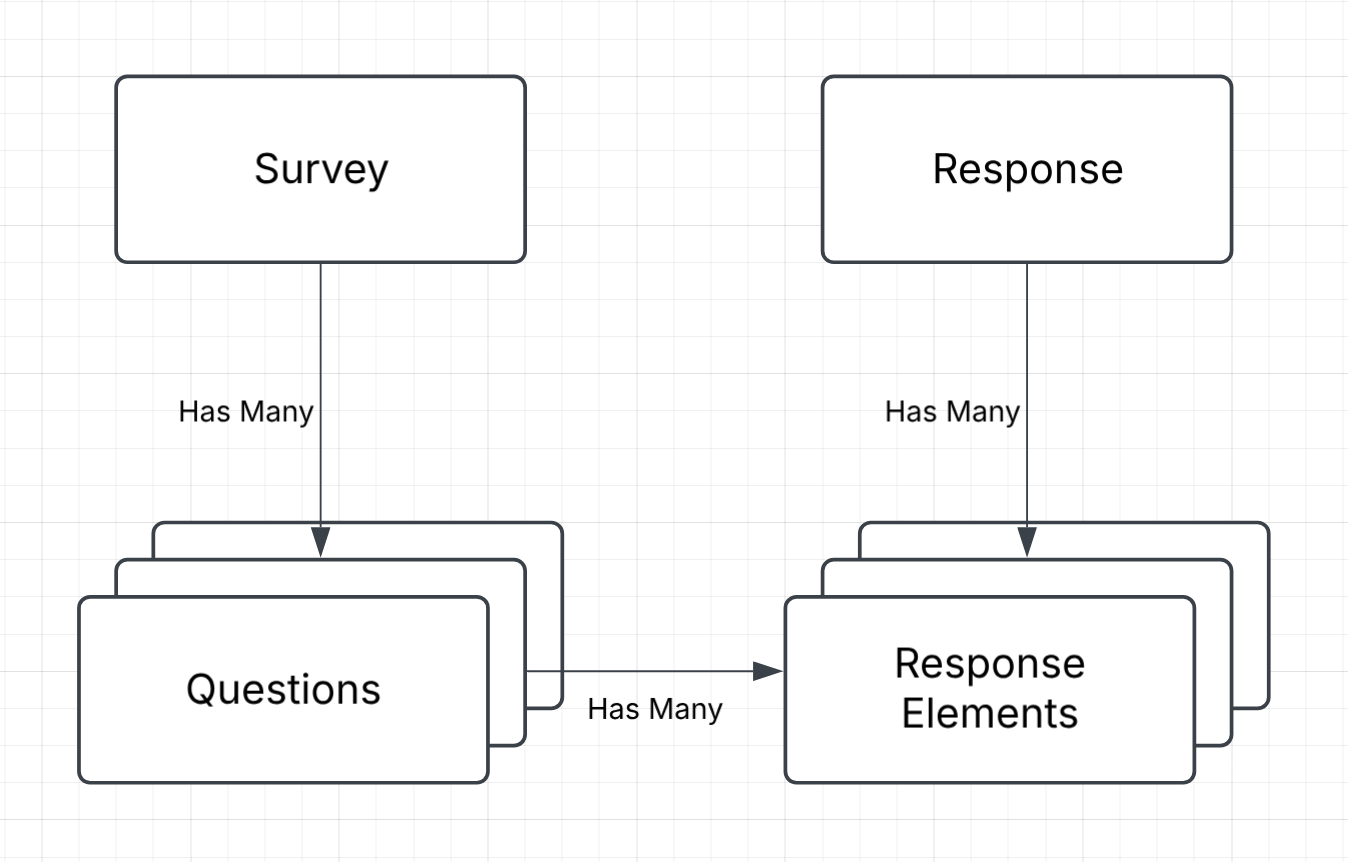 * `Survey`: Contains the survey name and description. Is made up of many `questions`.
* `Question`: Contains the question text and many `responseElements` - the answers provided by respondents for this particular question.
* `Response`: Is made up of all the `responseElements` for a single respondent's response to a survey.
* `ResponseElement`: One question/answer pair from a respondent's response to a survey.
By connecting every question-answer pair (a `responseElement`) to a particular question within a survey, we can analyze the themes and trends across your survey responses.
## Analytics
If Aftercare can build an internal data model over your survey responses, we will be able to provide analytics to help you understand your data.
We currently provide coding/categorization over all responses for each question. We'll be developing more analytics features in the near future, so stay tuned!
### Coding:
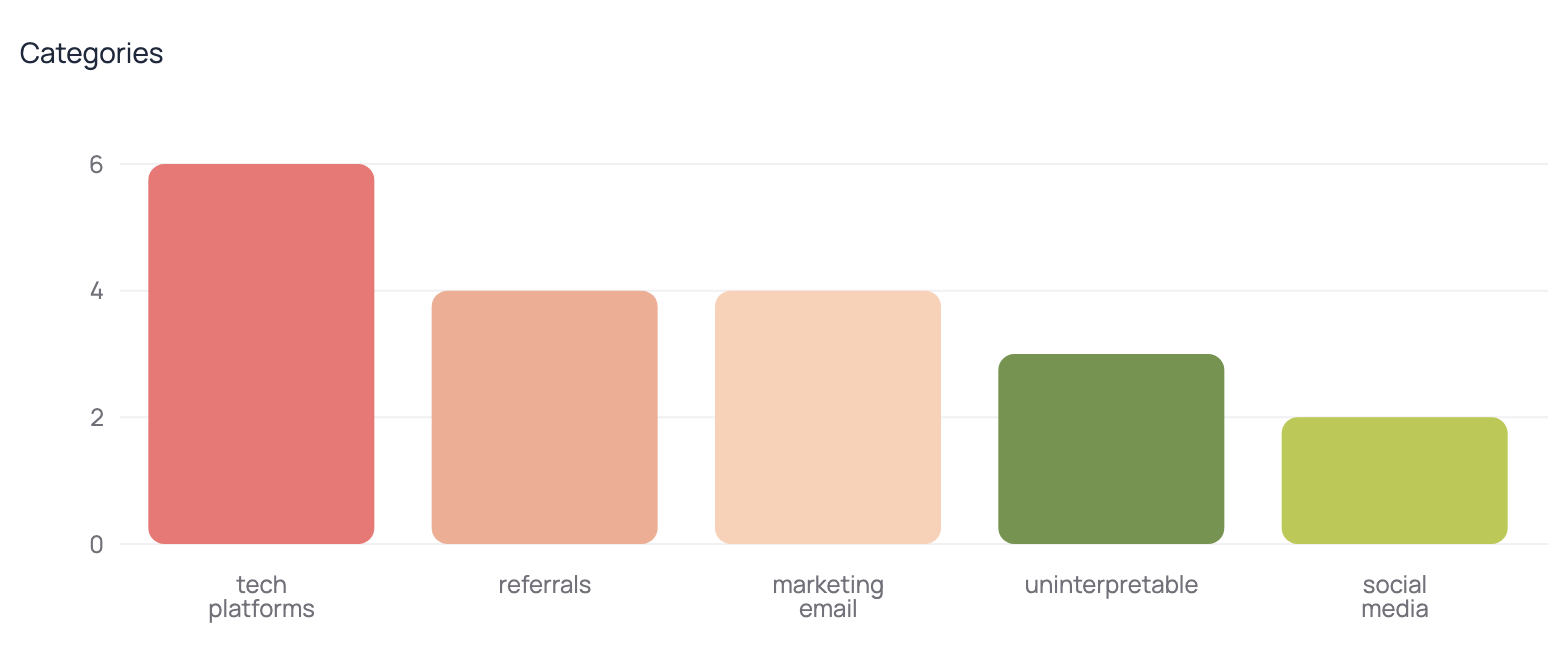
We use AI to automatically code all your responses. Let us handle generating the code frame or you can provide one yourself.
We categorize and subcategorize as needed to generate a theme hierarchy for your responses. We can perform the coding in real-time as responses come in or at the end when all the responses have been completed.
**For example:**
* Level 1:
* `Survey`: Contains the survey name and description. Is made up of many `questions`.
* `Question`: Contains the question text and many `responseElements` - the answers provided by respondents for this particular question.
* `Response`: Is made up of all the `responseElements` for a single respondent's response to a survey.
* `ResponseElement`: One question/answer pair from a respondent's response to a survey.
By connecting every question-answer pair (a `responseElement`) to a particular question within a survey, we can analyze the themes and trends across your survey responses.
## Analytics
If Aftercare can build an internal data model over your survey responses, we will be able to provide analytics to help you understand your data.
We currently provide coding/categorization over all responses for each question. We'll be developing more analytics features in the near future, so stay tuned!
### Coding:
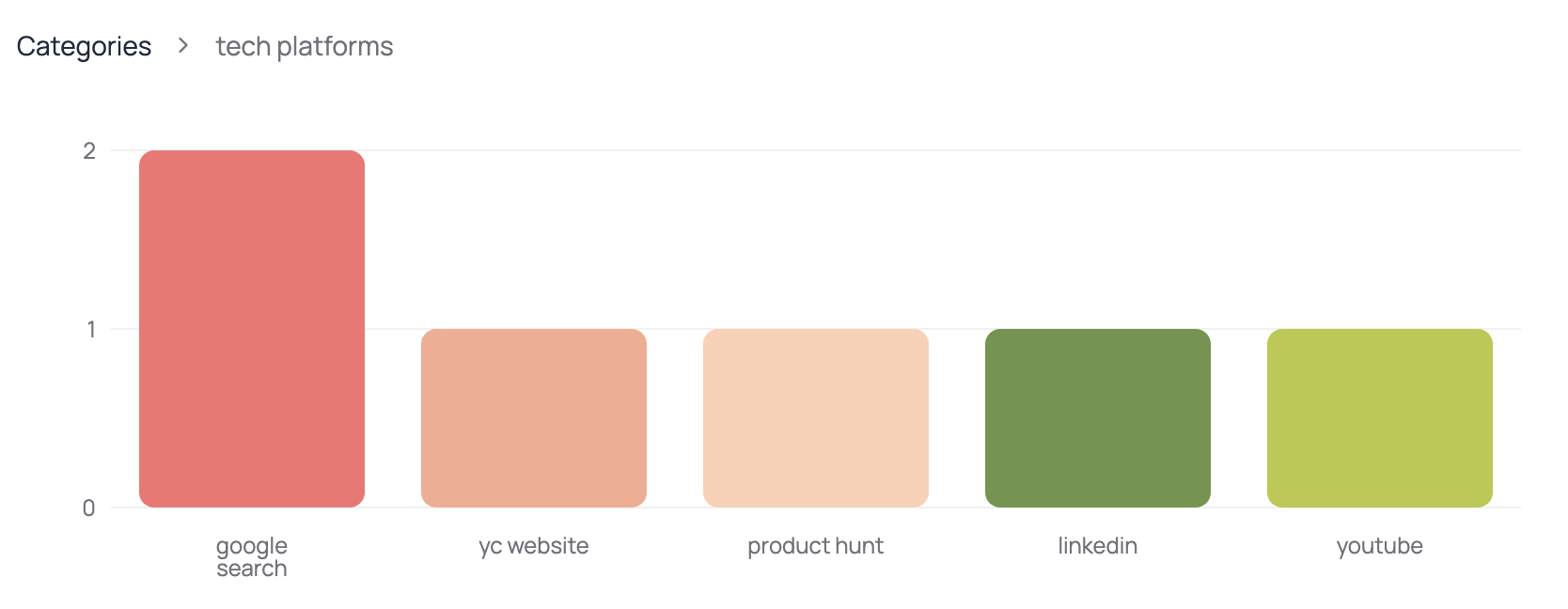
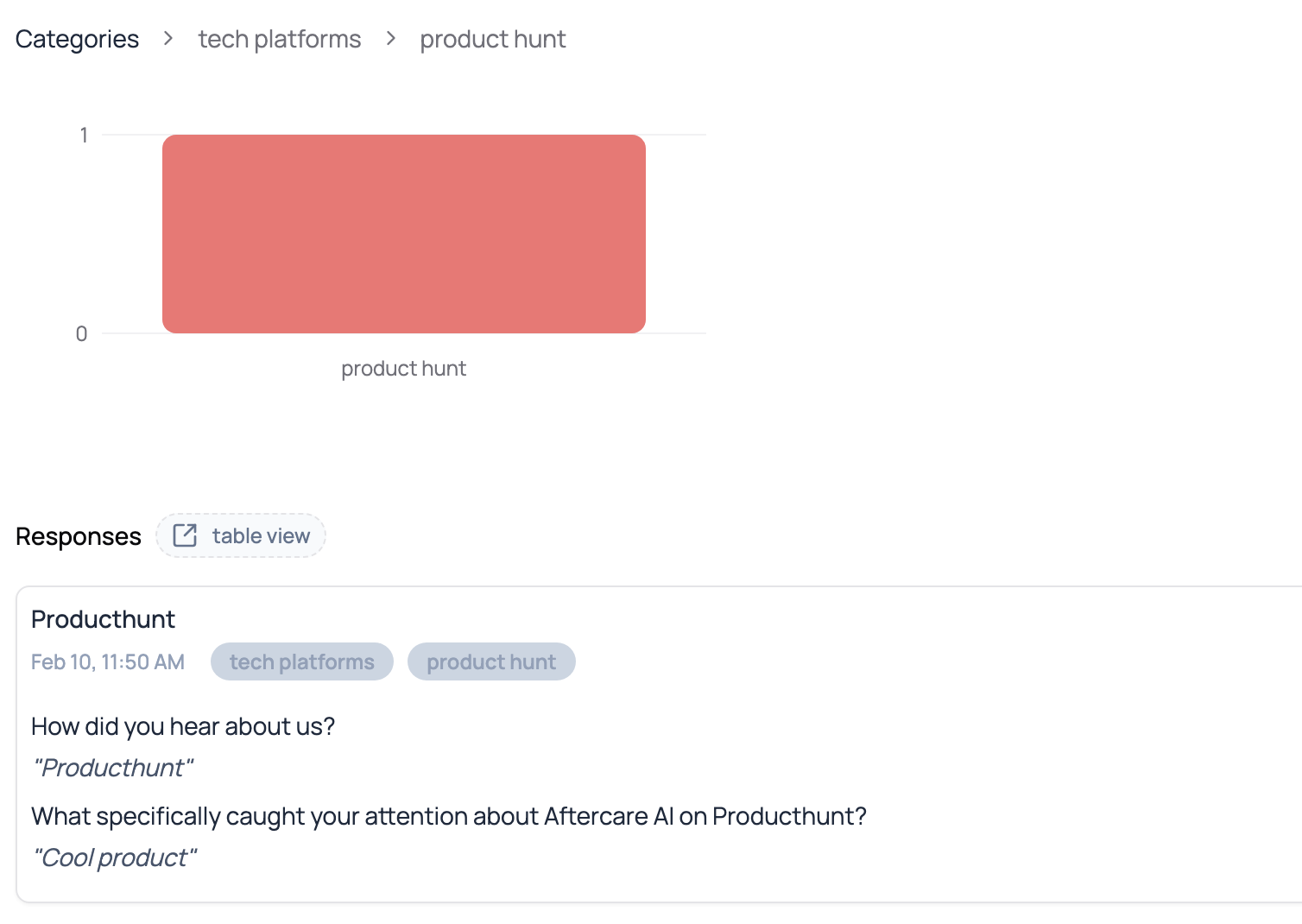
We use AI to automatically code all your responses. Let us handle generating the code frame or you can provide one yourself.
We categorize and subcategorize as needed to generate a theme hierarchy for your responses. We can perform the coding in real-time as responses come in or at the end when all the responses have been completed.
**For example:**
* Level 1:
 * Level 2:
 * Level 3:
 ## Identifiers
To allow Aftercare to model your survey data, you'll need to provide a few piece of information that uniquely identify each survey object, what we call `identifiers`:
Identifiers are optional! Aftercare only models your survey data if you
provide the required identifiers for the particular API call. So don't worry
\-- if you don't want Aftercare to model your survey data, you don't need to
provide these identifiers and you can still use the API as normal.
* `surveyIdentifier`: A string that uniquely identifies the survey across your organization. (e.g. "Survey\_01")
* `questionIdentifier`: A string that uniquely identifies a question for a particular survey. (e.g. "Q1")
* `responseIdentifier`: A string that uniquely identifies one respondent's entire response to a survey. This means that if a respondent answers multiple questions within the same survey, they should all have the same responseIdentifier. (e.g. "7a54b8da-f65d-4946-9c9a-f202e0cc29c8")
Not all API endpoints require all three identifiers to model your survey data, but you can see the requirements for each endpoint in the API reference.
On the difference between `surveyIdentifier` and `surveyName`:
* `surveyIdentifier`: A string that uniquely identifies the survey across your
organization. Think of it as you would any ID for an object in a database.
(e.g. "Survey\_01")
* `surveyName`: The name of the survey as it will appear in the Aftercare platform
for tracking usage or analytics. You want it to be easy to understand so you
can easily tell surveys apart from each other. (e.g. "Brand Tracking XYZ")
## Identifiers
To allow Aftercare to model your survey data, you'll need to provide a few piece of information that uniquely identify each survey object, what we call `identifiers`:
Identifiers are optional! Aftercare only models your survey data if you
provide the required identifiers for the particular API call. So don't worry
\-- if you don't want Aftercare to model your survey data, you don't need to
provide these identifiers and you can still use the API as normal.
* `surveyIdentifier`: A string that uniquely identifies the survey across your organization. (e.g. "Survey\_01")
* `questionIdentifier`: A string that uniquely identifies a question for a particular survey. (e.g. "Q1")
* `responseIdentifier`: A string that uniquely identifies one respondent's entire response to a survey. This means that if a respondent answers multiple questions within the same survey, they should all have the same responseIdentifier. (e.g. "7a54b8da-f65d-4946-9c9a-f202e0cc29c8")
Not all API endpoints require all three identifiers to model your survey data, but you can see the requirements for each endpoint in the API reference.
On the difference between `surveyIdentifier` and `surveyName`:
* `surveyIdentifier`: A string that uniquely identifies the survey across your
organization. Think of it as you would any ID for an object in a database.
(e.g. "Survey\_01")
* `surveyName`: The name of the survey as it will appear in the Aftercare platform
for tracking usage or analytics. You want it to be easy to understand so you
can easily tell surveys apart from each other. (e.g. "Brand Tracking XYZ")